
|
|
|
|
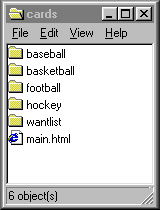
1.) CREATE a folder (ON YOUR DESKTOP) named- cards. 2.) CREATE up to 5 sub-folders (IN YOUR cards FOLDER) named- wantlist , baseball , basketball , football , and/or hockey. note: All folder names are small letters. 3.) PLACE your webpages, year&make.html or player.html, in the appropriate sub-folders. example: 91-92topps.html for your SET listings and example: gretzky.html for your PLAYER listings. note: TEMPLATES are supplied for making these types of pages. 4.) PLACE your listings page named- main.html (see letter C. below) in your cards folder. note: This file must be linked to pages in the sub-folders (see number 2. above). note: A TEMPLATE is supplied for making this type of page. 5.) UPLOAD your files and your folders to your server. note: The files must be uploaded exactly as specified for the desktop files, folders, and sub-folders. 6.) SUBMIT an address to your main.html & your site will be a "COMPARE @ JCPages"-compatible website.. note: The files must include links to, the COMPARE @ JCPages frames page, your email address, your homepage and/or main.html, and a specific description of the cards. 7.) ALLOW JCPages to take it from here..
A.) Webpage/Webpages, listing all of the numbers you have/need, from any CARD SET. B.) Webpage/Webpages listing, all cards you have/need, from any PLAYER/PLAYERS. C.) A webpage listing of SETS/PLAYERS you have/need. (LINKS TO PAGES FROM "A" & "B")
FOR YOU * Your entire Sportscards site listed in the JCPages Searchable Database. * ACCESS to your C:DRIVE, to Compare your listings. * TEMPLATES to list your cards, online & on your C:DRIVE. * MUCH more in the future.
|
A great reason to put the link on your website.
|
Click on one of the set listings, to open a page listing the cards I have available from the set you clicked on.
After the page has opened, scroll down to the
|
|
Click here to see the link in action.
The link is available in the top frame of the COMPARE PAGE,
or you can click here to get it.
(the table is made from a template I have created for this specific purpose).
NOTE : Template tested with Microsoft IE5.0 & Netscape4.6 !!